
Key takeaways
- PHP2Shell is the name for two critical PHP vulnerabilities, CVE-2026-109618 and CVE-2026-109619, each rated CVSS 9.2.
- The flaws sit in the PHP runtime itself, so WordPress, Drupal, Joomla, and custom PHP applications can be exposed even when their own code is secure.
- Exploitation can lead to unauthenticated remote code execution (RCE) and leakage of sensitive data from PHP process memory.
- Fixed releases are PHP 8.2.35, 8.3.36, 8.4.27, and 8.5.12. Patch, restart PHP workers, and confirm the version actually running in production.
PHP powers roughly 70% of websites on the internet.
WordPress, Drupal, Joomla, and thousands of custom applications run on it. At Astra, we’ve spent years protecting these applications with firewalls, malware scanning, and vulnerability detection.
So when vulnerabilities show up in PHP’s core engine, it’s worth paying attention.
On October 21, 2026, two critical PHP vulnerabilities were publicly disclosed under the name PHP2Shell. Both carry a CVSS score of 9.2 and can allow unauthenticated attackers to execute code on vulnerable servers.
The interesting part isn’t just the severity. These bugs had existed for years. AI helped researchers turn complex memory-safety issues into working exploits.
Here’s what happened, how the vulnerabilities work, and what you should do about them.
What is PHP2Shell?
PHP2Shell refers to two CVEs affecting PHP’s core engine:
| CVE | Severity | Key issue |
|---|---|---|
| CVE-2026-109618 | CVSS 9.2 | Upload-progress handling, memory corruption, and process-memory disclosure |
| CVE-2026-109619 | CVSS 9.2 | Stale internal state and OPcache type confusion |
The important distinction is that these are not WordPress plugin vulnerabilities or bugs in a particular CMS. The underlying issues exist in PHP itself.
Wiz Research demonstrated unauthenticated remote code execution against WordPress, Drupal, and Joomla. But these are examples of affected applications, not an exhaustive list. A vulnerable PHP runtime can expose an application even when its own code is secure.

How do the PHP2Shell vulnerabilities work?
To understand PHP2Shell, you need to understand two concepts: use-after-free and type confusion.
A use-after-free happens when software continues using a piece of memory after it has been released. A type-confusion bug happens when software interprets data as the wrong kind of object.
Both can be dangerous because they allow an attacker to influence how a program reads, writes, or interprets memory.
1. CVE-2026-109618: PHP’s upload-progress handling
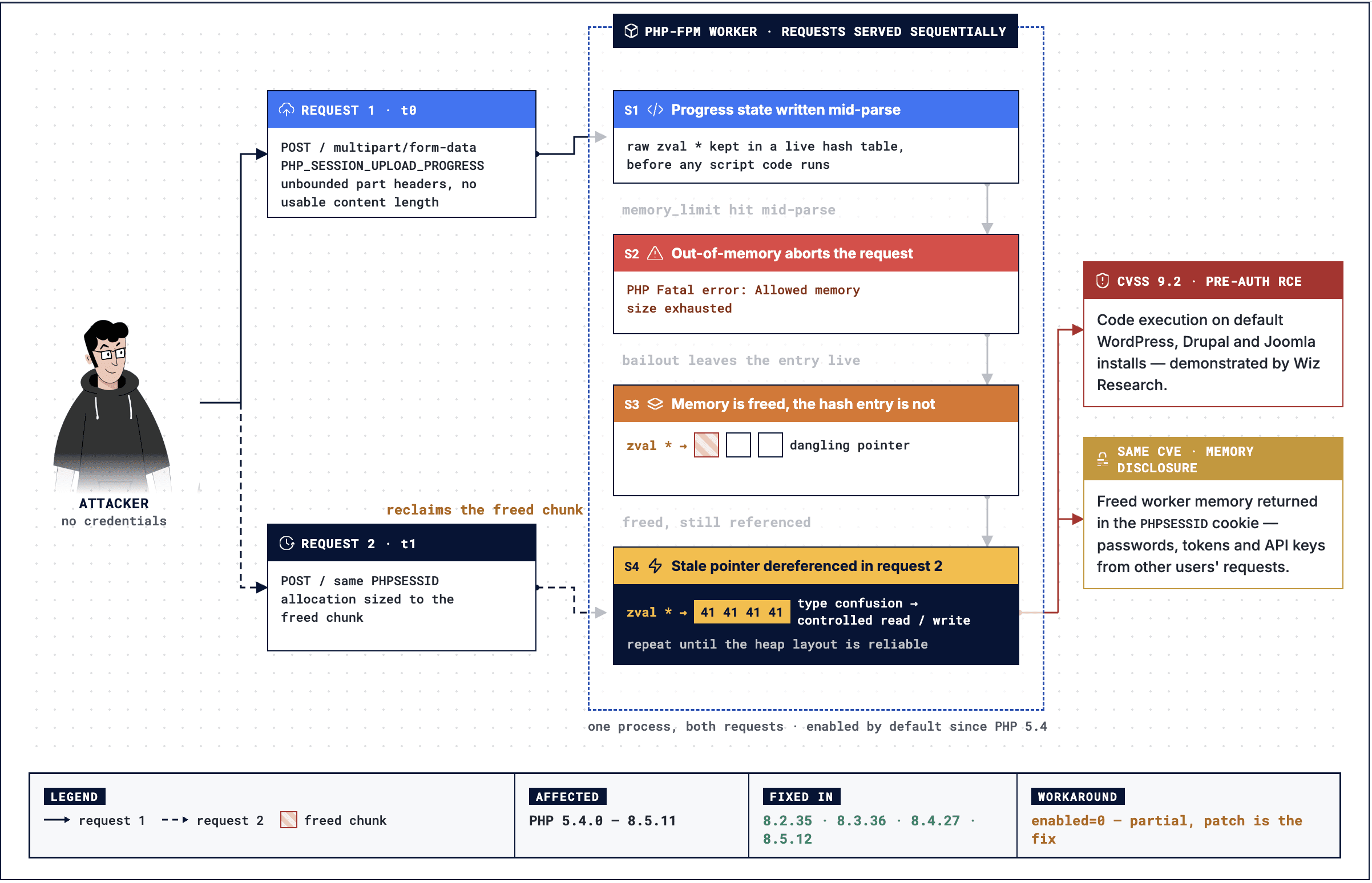
PHP supports a feature called session upload progress. It lets applications track the progress of file uploads.
The problem identified by Wiz involves how PHP handles internal state during request processing, particularly when an out-of-memory error interrupts normal execution.
If PHP fails partway through processing a request, its cleanup routines may encounter internal data that was never fully initialized or that points to memory that has already been released.
Under the right conditions, a subsequent request can interact with this stale state.
Wiz demonstrated that this family of issues could be used to corrupt PHP process memory and achieve unauthenticated RCE on WordPress, Drupal, and Joomla. The researchers also demonstrated a related memory-disclosure issue that could expose sensitive data from a PHP worker.
That data could include credentials, tokens, or API keys belonging to other requests.
The security implication is important: a memory-safety flaw can expose more than the application handling the request. It can potentially expose data held in the same process.
2. CVE-2026-109619: Stale state and OPcache
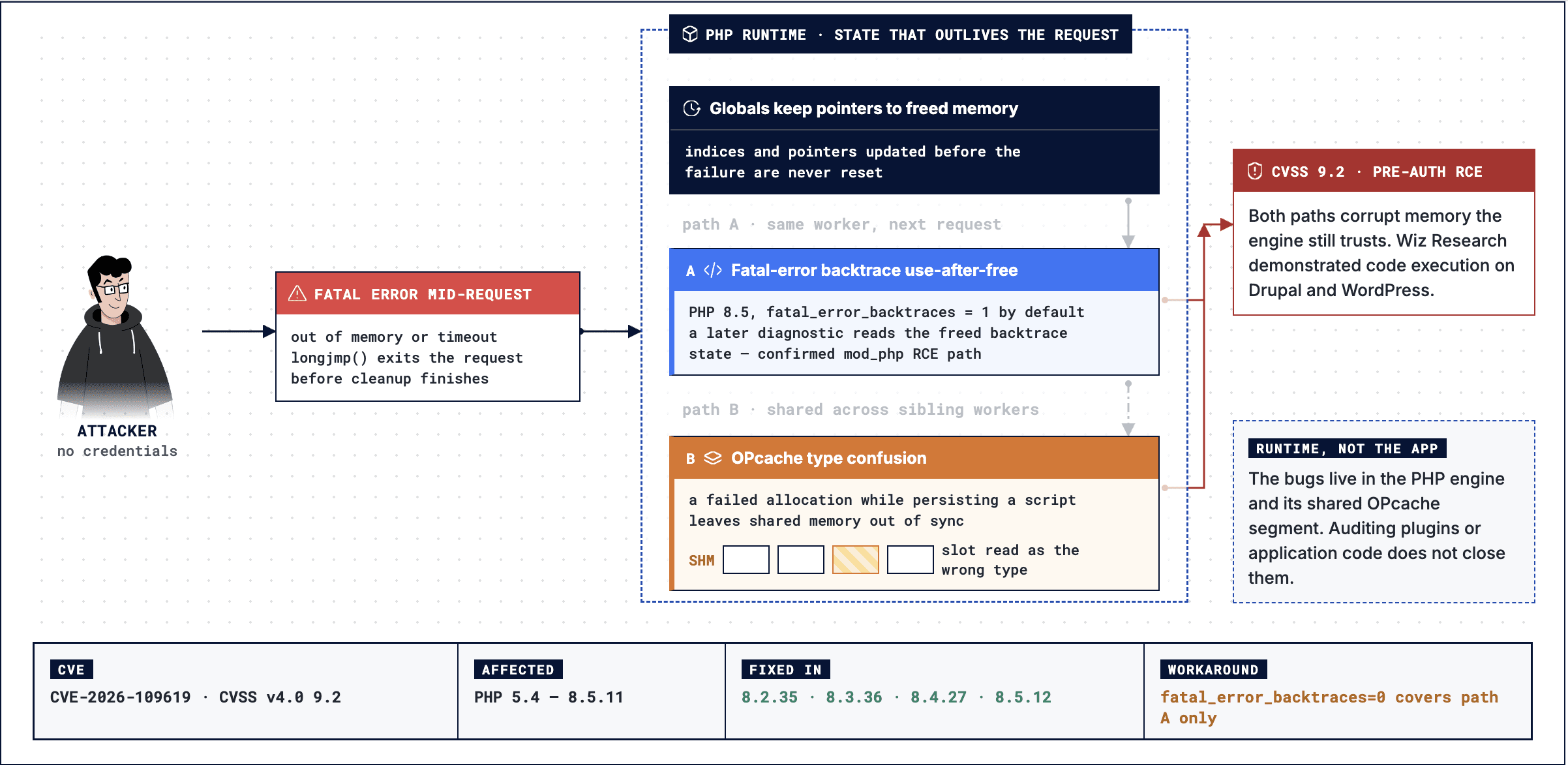
The second CVE involves additional problems with internal state retained across requests and with OPcache, PHP’s bytecode caching system.
PHP workers and OPcache maintain internal references to objects and memory. Those references must remain valid as requests finish, new requests begin, and cached code is managed.
If a reference survives after the memory it points to has been released, later execution can access invalid state. Separately, inconsistencies in how OPcache tracks runtime objects can cause a memory slot to be interpreted as an object of the wrong type.
These are different exploitation paths, but both create opportunities for memory corruption.
Wiz demonstrated unauthenticated RCE against Drupal and WordPress using the relevant exploit paths.
The important point is that these are runtime-level weaknesses. Fixing a CMS plugin or reviewing application code alone does not resolve them.
The PHP2Shell incident also raises a question that came up during Astra’s discussion with security leaders: does patching mean the incident is resolved? As one team’s experience showed, fixing vulnerable systems is only half the job. Organizations must also investigate whether exploitation occurred before remediation and extend the assessment to affected third-party systems.
We explored these challenges in Beyond the PHP Patch: How Security Leaders Are Responding to a Week of Critical Incidents.
Why PHP2Shell is different from other PHP vulnerabilities
There are three things worth paying attention to.
1. The attack surface is much larger than a single application.
PHP runs across hosting providers, containers, CMS platforms, and custom applications. Security teams may not even have a complete inventory of every PHP runtime in their environment.
2. Memory disclosure can make exploitation easier.
An attacker does not always need to jump straight to code execution. Information leaked from process memory can reveal addresses, credentials, or other data that makes subsequent exploitation easier.
3. AI changes the economics of exploit development.
According to Wiz, frontier AI models helped researchers discover these issues and develop working exploits. The process involved chaining bugs, adapting to different memory layouts, testing, and debugging.
This is where I think the bigger story lies.
The code had existed for years. The fact that a bug has survived for a long time does not mean it is safe. And complexity is becoming a weaker barrier when AI can help researchers reason through it and iterate on working exploits.
That cuts both ways. Attackers can move faster, but defenders can also use AI to find weaknesses and improve detection before they are exploited.
How to Fix PHP2Shell
Patching is the primary remediation for PHP2Shell (CVE-2026-109618 and CVE-2026-109619). Check the official PHP security advisories and CVE-2026-109619 advisory for remediation guidance.
Prioritize these steps:
- Identify affected runtimes: Inventory PHP across production, staging, containers, CMS installations, and legacy applications.
- Patch and verify: Install a fixed release or verified vendor security update. Restart affected services and confirm the production runtime is patched.
- Apply temporary workarounds: If immediate patching isn’t possible, restrict public access, disable session upload progress where appropriate, and apply vendor-recommended mitigations. These measures reduce exposure but do not replace patching.
- Assess exposure: Use Astra’s PHP2Shell Exposure Checker. Astra DAST and Autonomous Penetration Testing can also help identify vulnerabilities and validate exploitable attack paths.
- Investigate and rescan: Review suspicious activity, verify the fix, and investigate any remaining findings.
Important: Updating WordPress or another application does not update its underlying PHP runtime. Apply security updates and verify the actual runtime to remediate PHP2Shell exposure.
How to Check If Your Website Is Vulnerable to PHP2Shell
PHP2Shell affects the PHP runtime itself, so your application can be vulnerable even if its source code contains no obvious security flaws. To determine whether your website is exposed to CVE-2026-109618 and CVE-2026-109619, verify the PHP version serving web requests and use an authorized exposure checker.
You can assess your website using the following methods.
1. Check Your Website Using Astra’s PHP2Shell Exposure Checker
The easiest way to perform an initial assessment is to use Astra’s free PHP2Shell Exposure Checker. It checks the PHP release exposed by a public website and compares it against known fixed versions.
Follow these steps to get started.
Step 1: Open the PHP2Shell checker
Visit https://php2shell.getastra.com/.
Step 2: Enter your website URL
Enter the public URL of the website you own or are authorized to assess.
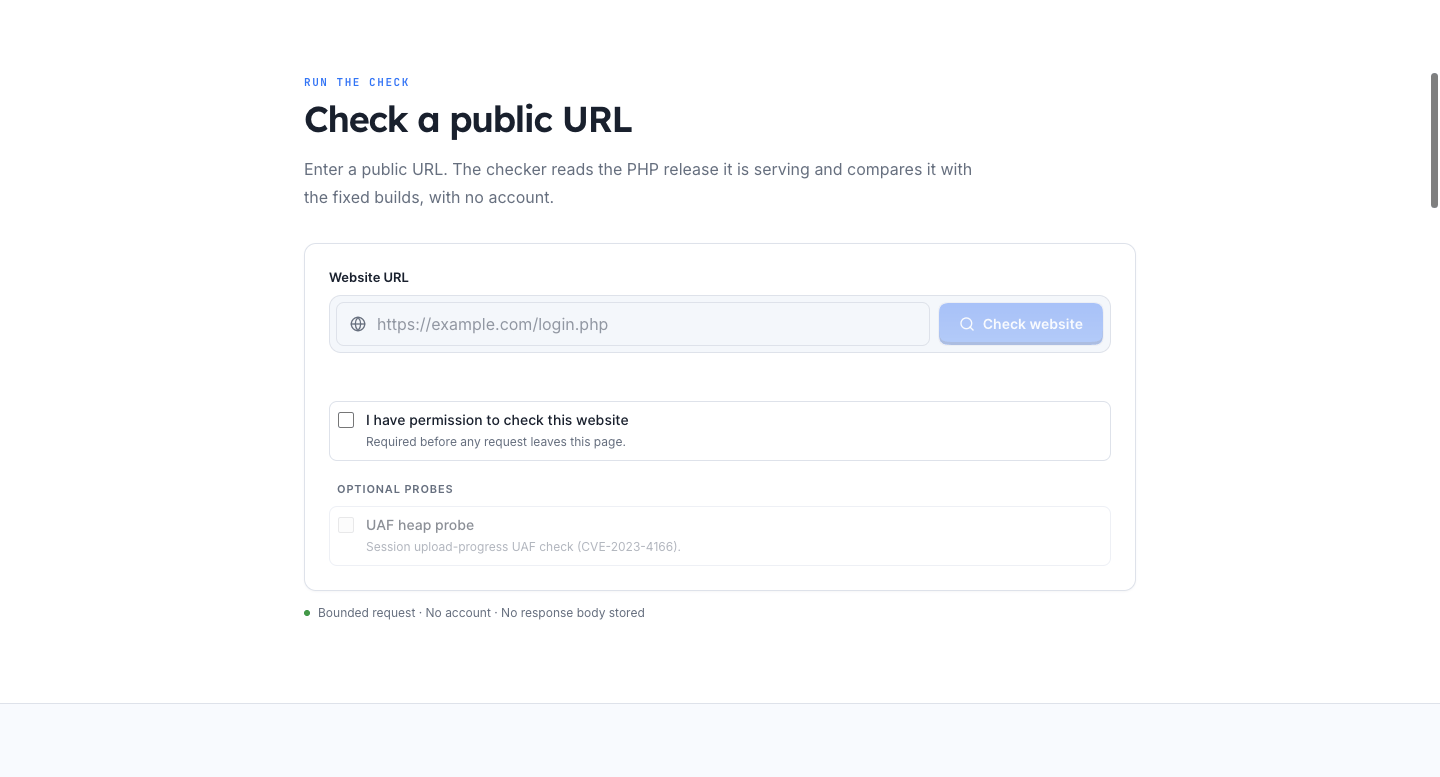
Step 3: Confirm authorization
Select the authorization checkbox before submitting your request.
Step 4: Run the check
Click Check website to identify the PHP release exposed by your website and determine whether it matches a fixed version.
The checker reads available X-Powered-By and Server response headers. If the PHP version is hidden, the tool allows you to enter the version manually.
Step 5: Review the result
Use the result to determine your next steps:
- Fixed version detected: The reported PHP release meets the applicable fixed-version threshold. This does not guarantee that the website is free from other vulnerabilities.
- Potentially vulnerable version detected: The reported version falls below the fixed release for its branch. Verify the installed package and prioritize patching.
- Version not detected: Check the PHP runtime directly on your server. Hidden version headers do not indicate that the vulnerability has been fixed.
Our checker also offers optional probes for additional assessment, including a session upload-progress use-after-free check and an out-of-memory probe. These checks go beyond simple version identification and may affect the availability of low-memory PHP workers. Use them only on authorized systems, preferably in staging or during an approved maintenance window.
2. Verify the PHP Version Running on Your Server
A public website check is a useful starting point, but you should also verify the PHP runtime actually serving requests.
Check the command-line PHP version:
php -v
For PHP-FPM environments, check the PHP-FPM binary as well:
php-fpm -v
If you run PHP in Docker, check the version inside the relevant application container:
docker exec <container_name> php -v
Important: The CLI version may differ from the PHP-FPM pool or Apache module serving your website. Check every relevant runtime, including containers, parallel PHP installations, hosting control panels, and long-running application workers.
Automate the check with our open-source triage skill: Because php -v can report a different binary from the one serving traffic, we built php2shell-triage, a free Claude skill and plugin for defenders. Its read-only assessor walks /proc to find the real binary behind every running PHP-FPM, Apache, and CLI worker.
It also flags workers still running an old binary after an upgrade, and tells distro-backported fixes apart from vulnerable builds. It then guides you through hunting for signs of exploitation and the remediation steps. It runs only on hosts you own and contains no exploit code
3. Compare Your PHP Version Against Fixed Releases
The following upstream PHP releases include fixes for PHP2Shell:
| PHP branch | PHP2Shell fix status | Security support until |
|---|---|---|
| PHP 8.5 | Patched in 8.5.12 | Dec 31, 2029 |
| PHP 8.4 | Patched in 8.4.27 | Dec 31, 2028 |
| PHP 8.3 | Patched in 8.3.36 | Dec 31, 2027 |
| PHP 8.2 | Patched in 8.2.35 | Dec 31, 2026 (ending soon) |
| PHP 7.4, 8.0, 8.1 | No official release. Minimal source backports only | End of life |
| PHP 5.4 to 7.3 | No fix from the PHP project | End of life |
If you are running an earlier release in one of these branches, verify your installation’s patch status and upgrade as necessary. PHP 8.1 and older branches require additional attention because they are no longer supported upstream; consult your operating system or hosting vendor for security backports, or upgrade to a supported branch.
A version number alone does not always establish vulnerability status. Some Linux distributions and container images backport security fixes while retaining an older upstream version number.
4. Verify Security Backports From Your Package Vendor
If your server runs a vendor-maintained PHP package, check whether the vendor has applied the PHP2Shell security fixes.
On Debian or Ubuntu, inspect the package changelog:
apt changelog php8.3-cli | grep -E 'CVE-2026-109618|CVE-2026-109619'
On RHEL, Rocky Linux, or AlmaLinux, inspect the installed package changelog:
rpm -q php-cli --changelog | grep -E 'CVE-2026-109618|CVE-2026-109619'
Replace the example package name with the package installed on your system. A matching entry is useful evidence, but confirm the installed package version and vendor advisory before concluding that the running runtime is patched.
For containerized applications, verify the image used for deployment and rebuild or redeploy containers as necessary. Updating the host or a running container alone may leave older images available for subsequent deployments.
5. Restart PHP Workers and Recheck the Website
After applying the relevant security updates:
- Restart PHP-FPM, Apache, and other affected services as appropriate.
- Rebuild and redeploy affected container images.
- Ensure that no workers are still running an outdated PHP build.
- Run the Astra PHP2Shell checker again and verify the installed package status.
A successful version check is not a substitute for verifying that the updated runtime is actually serving production traffic.
How Astra Helps Customers Stay Protected
Astra helps businesses strengthen their security posture through its DAST scanner and autonomous penetration testing platform. These solutions help identify vulnerabilities across web applications, validate exploitable attack paths, and provide technical evidence and actionable remediation guidance.
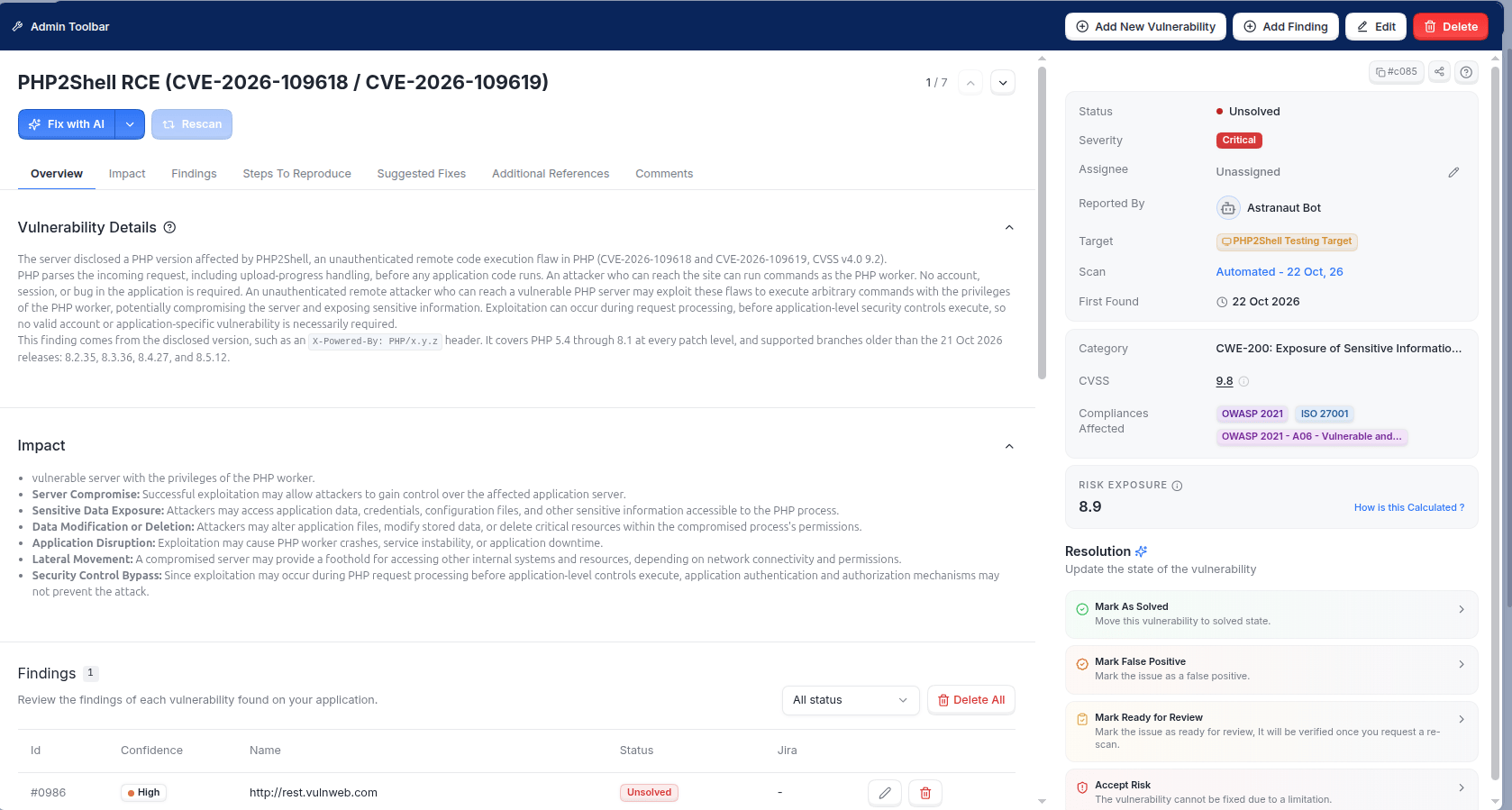
Existing Astra’s DAST customers can use Lightning Scan for quick vulnerability checks and regular scans for deeper security assessments. These capabilities help teams identify security weaknesses, prioritize remediation, and continuously assess their applications.
Astra’s Autonomous Penetration Testing can further help identify vulnerabilities such as PHP2Shell (CVE-2026-109618 and CVE-2026-109619) by testing applications for exploitable attack paths and validating potential security risks. This enables teams to better understand the impact of vulnerabilities and prioritize fixes based on their actual risk.
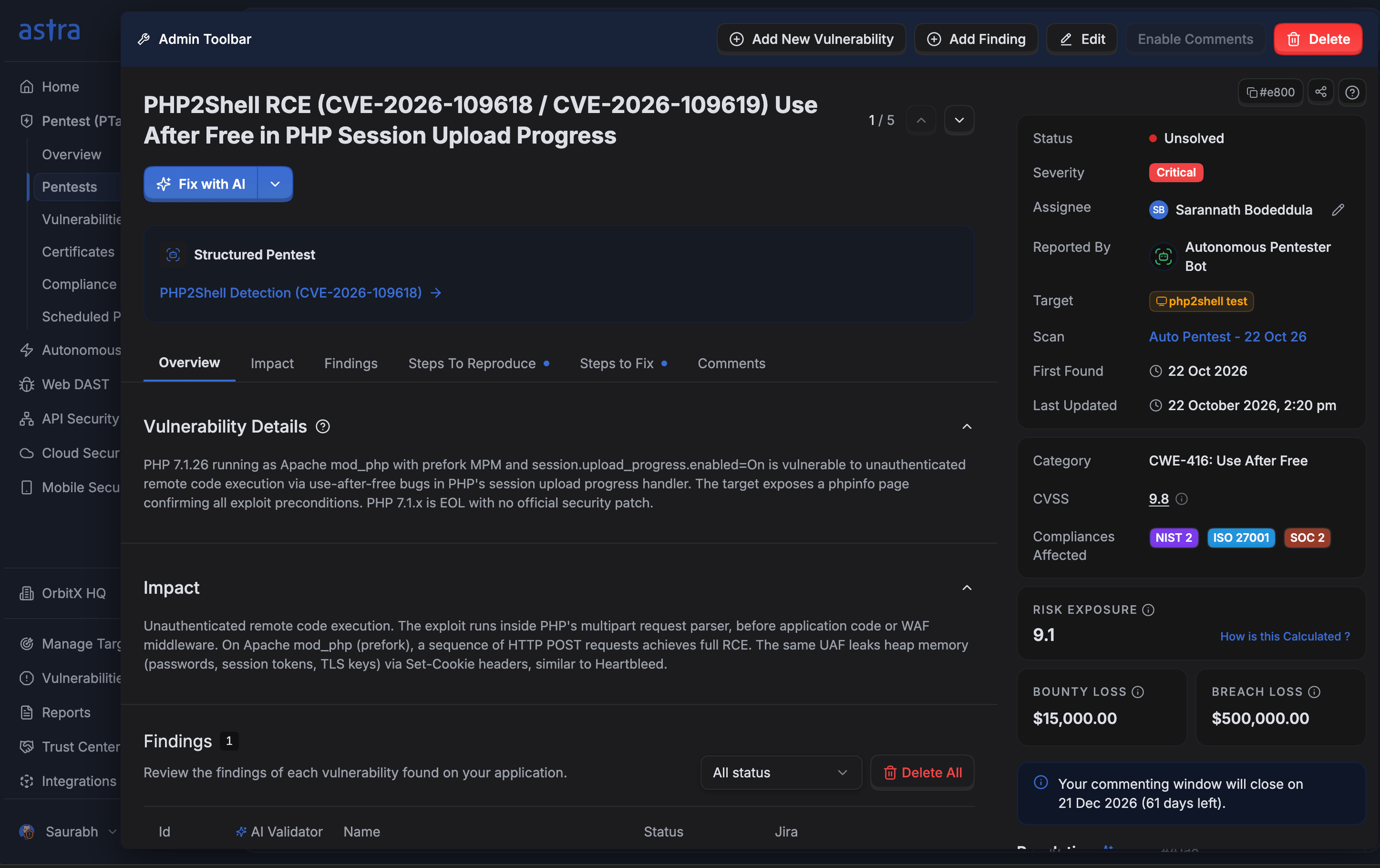
Beyond detection, Astra provides technical reproduction steps, evidence of exploitability, and actionable remediation guidance, enabling developers to understand the root cause, verify fixes, and reduce exposure to emerging threats.
While detection helps identify exposure early, it does not replace remediation. Customers should promptly upgrade affected PHP runtimes to patched versions and rescan their assets to confirm that the vulnerability has been resolved.
Final thoughts
PHP2Shell is a reminder that application security does not stop at application code.
Your application can be well written and still inherit serious risk from the runtime it depends on.
The immediate priority is straightforward: identify affected runtimes, patch them, and investigate anything suspicious.
The longer-term lesson is about AI. Vulnerabilities that were difficult to discover and exploit are becoming more accessible to researchers. Defenders need to use these same advances to discover weaknesses earlier and reduce the time between disclosure and remediation.
The goal is not just to know which vulnerabilities exist. It’s to know where you’re exposed, validate the risk, and fix it before someone else gets there.
Disclosure timeline
The responsible disclosure process unfolded as follows:
| Date | Event |
|---|---|
| August 19, 2026 | Wiz Research discovered the first vulnerability |
| August 20, 2026 | Unauthenticated RCE was confirmed against Drupal |
| August 21, 2026 | Unauthenticated RCE was confirmed against WordPress |
| August 24, 2026 | The findings were reported to the PHP security team |
| September 21, 2026 | PHP acknowledged the reports and began developing a coordinated fix |
| October 21, 2026 | Fixed PHP releases became available and the vulnerabilities were publicly disclosed |
The response required coordination between the PHP team, researchers, and security providers preparing patches, detections, and mitigations.
PHP2Shell FAQs
What is PHP2Shell?
PHP2Shell is the name given to two critical vulnerabilities in PHP’s core engine, CVE-2026-109618 and CVE-2026-109619. Both are rated CVSS 9.2 and were publicly disclosed on October 21, 2026, together with fixed PHP releases.
Which PHP versions fix the PHP2Shell vulnerabilities?
Official fixes are available in PHP 8.2.35, 8.3.36, 8.4.27, and 8.5.12. PHP 8.1 and older are end of life and have no official patched release. The PHP security team published minimal source backports for 7.4, 8.0, and 8.1, and some Linux distributions and LTS vendors ship backported packages. Versions older than 7.4 have no fix from the PHP project.
Does updating WordPress, Drupal, or Joomla fix PHP2Shell?
No. PHP2Shell lives in the PHP runtime, not in CMS code or plugins. Updating your CMS leaves the vulnerable runtime in place, so the PHP installation itself must be upgraded and its workers restarted.
Why are these PHP vulnerabilities considered so serious?
They can allow unauthenticated remote code execution, and one exploit path can leak data from PHP process memory, such as credentials or API keys belonging to other requests. Because PHP runs a large share of the web, the potential attack surface is very large.
Can a WAF protect against PHP2Shell?
WAF rules from your provider can add a layer of defense while patches roll out, but they do not replace the PHP security update.
How do I check if my applications are exposed to PHP2Shell?
Inventory every PHP runtime you operate, including staging, legacy, and third-party managed servers, then verify the version running in production. Astra’s DAST and Autonomous Pentest can help identify exposed applications and validate whether they can be attacked.
Who discovered PHP2Shell, and when was it disclosed?
Wiz Research discovered the first vulnerability on August 19, 2026, and confirmed unauthenticated RCE against Drupal and WordPress within two days. The findings were reported to the PHP security team on August 24, 2026. PHP acknowledged the reports on September 21, 2026, and fixed releases and public disclosure followed on October 21, 2026.
How does CVE-2026-109618 work?
CVE-2026-109618 abuses PHP’s session upload progress handling. If an out-of-memory error interrupts a request partway through, PHP’s cleanup routines can touch internal data that was never fully initialized or that points to memory already released. A later request can then interact with that stale state, which Wiz used to corrupt process memory and achieve unauthenticated RCE. A related path can disclose data held in the PHP worker’s memory.
How does CVE-2026-109619 work?
CVE-2026-109619 involves internal state that PHP keeps across requests and OPcache, PHP’s bytecode cache. If a reference survives after its memory has been released, later execution can access invalid state, which leads to a use-after-free. Separately, inconsistencies in how OPcache tracks runtime objects can cause a memory slot to be read as an object of the wrong type. Both paths create opportunities for memory corruption.
What should I do if I’m running PHP 8.1 or older?
PHP 8.1 and older are end of life, so there is no official patched release. Upgrade to a supported branch, install a backported package from your Linux distribution or LTS vendor, or build PHP from source using the PHP security team’s backports for 7.4, 8.0, and 8.1. Systems older than PHP 7.4 should be upgraded, isolated, or decommissioned.
Why doesn’t the PHP version number always show whether I’m protected?
Operating system vendors and hosting providers often backport security fixes without changing the PHP version number. If your PHP comes from one of them, check their advisory for the patched package instead of relying on the version string alone. After patching, restart PHP-FPM, web servers, and long-running workers, then confirm the version actually running in production.
What role did AI play in the PHP2Shell research?
According to Wiz, frontier AI models helped researchers discover these issues and develop working exploits, including chaining bugs, adapting to different memory layouts, testing, and debugging. The vulnerable code had existed for years. The lesson is that complexity is a weaker barrier than it used to be, for attackers and defenders alike.
What signs of PHP2Shell exploitation should I look for?
Review web server and application logs for unusual requests, unexpected PHP worker errors, unexplained process activity, and suspicious outbound connections. These signals are not proof of exploitation, but they help focus an investigation. Because one exploit path can leak credentials or API keys from other requests, consider rotating secrets on any system where you find suspicious activity.
Is Astra’s detection a substitute for patching PHP2Shell?
No. Astra’s DAST and Autonomous Pentest help identify exposed applications and validate whether attack paths are exploitable, which helps you prioritize remediation. You should still update every affected PHP runtime and verify the fix.
Sources
- Wiz Research: PHP2Shell, PHP RCE vulnerabilities
- PHP2Shell technical overview
- Official PHP advisory for CVE-2026-109618
- Official PHP advisory for CVE-2026-109619
- LiteLLM security incident
- Railway security disclosure
- eMudhra certificate security incident
- Google’s response to the eMudhra certificate issue